ExitLag review: does it actually work, is it safe, and is it worth paying for?

- ExitLag can lower ping and packet loss when your internet provider routes game traffic badly. It cannot fix weak Wi-Fi, an overloaded line or a far-away server.
- It runs on Windows, iOS and Android, supports 4,000+ games (its figure) and adds Multi-Internet, a traffic shaper and a network analyzer.
- It is not a privacy VPN: it is built to route game traffic over better paths.
- Test it on your own game with the 3-day free trial (no card, per ExitLag's trial page) before committing to a long plan.
ExitLag is the game booster most players hear about first: it is sponsored by streamers, used by professional players and promises lower ping in thousands of games. The honest answer to "does ExitLag work?" is sometimes, for a specific kind of lag. This review explains what ExitLag does, what it includes, when it helps and when it cannot, so you can decide whether it is worth testing, and how to test it properly.
ExitLag review in brief
| What it is | A game booster that routes game traffic through its own server network |
| Devices | Windows, iOS, Android |
| Supported games | 4,000+ games and apps (vendor's figure) |
| Network size | 1,500+ servers worldwide (vendor's figure) |
| Main features | AI route optimization, Multi-Internet, Traffic Shaper, Network Analyzer, Performance Boost, Community Servers |
| Pricing | Subscription; price shown at checkout and depends on country |
| Refunds | Within 7 days of subscribing, per its home page (terms apply) |
From ExitLag's official website, checked on 11 November 2026. Figures such as game count and server count are ExitLag's own claims.
- Try it
- 3-day free trial, no card
- Pays
- Subscription, price shown by country
- Runs on
- Windows, iOS, Android
- Games
- 4,000+ (vendor's figure)
- One-click, automatic routing
- Multi-Internet and Traffic Shaper
- Built-in Network Analyzer
- No console or macOS listed
- Price only visible at checkout
How ExitLag works
Normally your internet provider decides the path your game traffic takes to the server, and that path is not always the shortest or the least congested. ExitLag replaces part of that journey with its own network: your game traffic goes to an ExitLag server, travels across ExitLag's routes and reaches the game server from there.
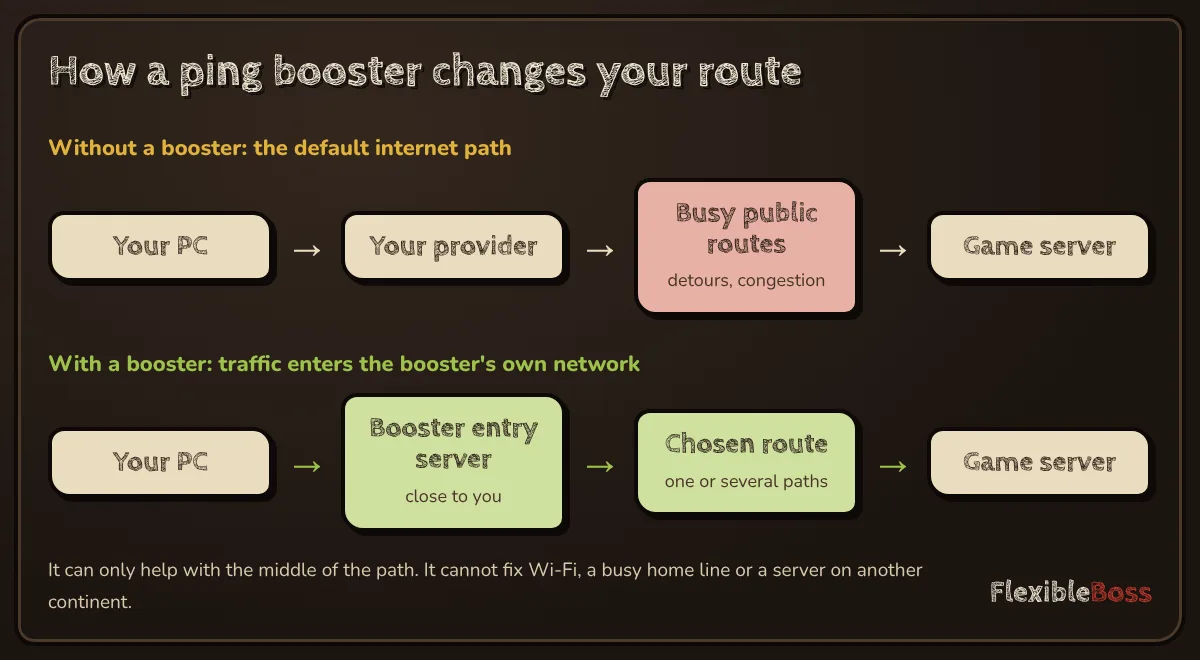
ExitLag describes AI Route Optimization that automatically prioritises the fastest paths. The idea is simple: if your provider's path to, say, a European server goes through a congested exchange at 9 p.m., ExitLag can send you another way.
Features
| Feature | What it does, per ExitLag | Who it helps |
|---|---|---|
| AI Route Optimization | Prioritises the fastest paths to the game server | Anyone with bad routing to a server |
| Multi-Internet | Switches automatically between more than one network (for example Wi-Fi and mobile data) | Players with an unstable main connection |
| Traffic Shaper | Prioritises optimized games and limits bandwidth for other activities | Shared home connections |
| Network Analyzer | Detects problems, monitors latency and packet loss, shows server ping by region | Anyone diagnosing lag |
| Performance Boost | Frees RAM to help FPS | Lower-end PCs |
| Community Servers | Private, community-created servers reached through optimized routes | Players of supported community servers |
The Network Analyzer is worth using even if you never subscribe long term: it shows whether your problem is latency, jitter or packet loss, which tells you whether a booster can help at all.
When ExitLag can lower your ping
A booster helps when the route is the problem. Typical signs:
- your ping is fine in the morning but jumps or spikes in the evening;
- you play on servers in another country or continent;
- friends in the same city get much better ping on the same server with a different provider;
- you see packet loss in the game's network graph, but your Wi-Fi and router are fine.
In these cases a different route can make a visible difference, especially to spikes and packet loss, which hurt more than a few milliseconds of average ping.
When ExitLag cannot help
No booster can fix problems that happen before your traffic leaves your home, or the basic physics of distance.
| Problem | Why a booster cannot fix it | What to do instead |
|---|---|---|
| Weak or crowded Wi-Fi | The delay happens before your provider | Use a cable, or improve Wi-Fi placement and channel |
| Ping jumps when others stream or download | Your connection is overloaded (bufferbloat) | Router QoS/SQM; ExitLag's Traffic Shaper can help on the PC itself |
| Server is very far away | Light in fibre needs about 1 ms per 100 km of round trip | Choose a closer server region |
| Low FPS mistaken for lag | It is a performance issue, not a network one | Lower graphics settings, update drivers |
Our free ping booster guide covers these free fixes in more detail.
Is ExitLag a VPN?
Not in the way most people mean. A privacy VPN encrypts all your traffic and hides your location. ExitLag also sends traffic through its own servers, but its purpose is routing game traffic over better paths, not privacy. If you want privacy for browsing, a booster is the wrong tool; if you want better routes to game servers, a general VPN is usually the wrong tool, because it adds an extra stop and often increases ping.
Is ExitLag safe?
ExitLag is a long-established commercial product. Its site names professional players and content creators who use it, and it publishes a help centre with articles on subscriptions, free trials and features. The real safety risk comes from unofficial copies: "free ExitLag", cracked versions and repacks. They cannot connect to the real ExitLag network, so they cannot do what the paid app does, and a program with deep access to your network traffic is an ideal disguise for malware. Download ExitLag only from its official website.
Pricing, trials and refunds
ExitLag's pricing page shows plans after it detects your country, so the price depends on where you are and on current promotions. Its FAQ includes sections on free trials, a Multiplayer Plan, a 90 Days Free promotion and an ExitLag + Discord offer, which shows how often offers change. New users can start with a 3-day free trial that, according to ExitLag's trial page, needs no credit card. After you pay, the home page notes that refunds are possible within 7 days of subscribing, subject to its terms.
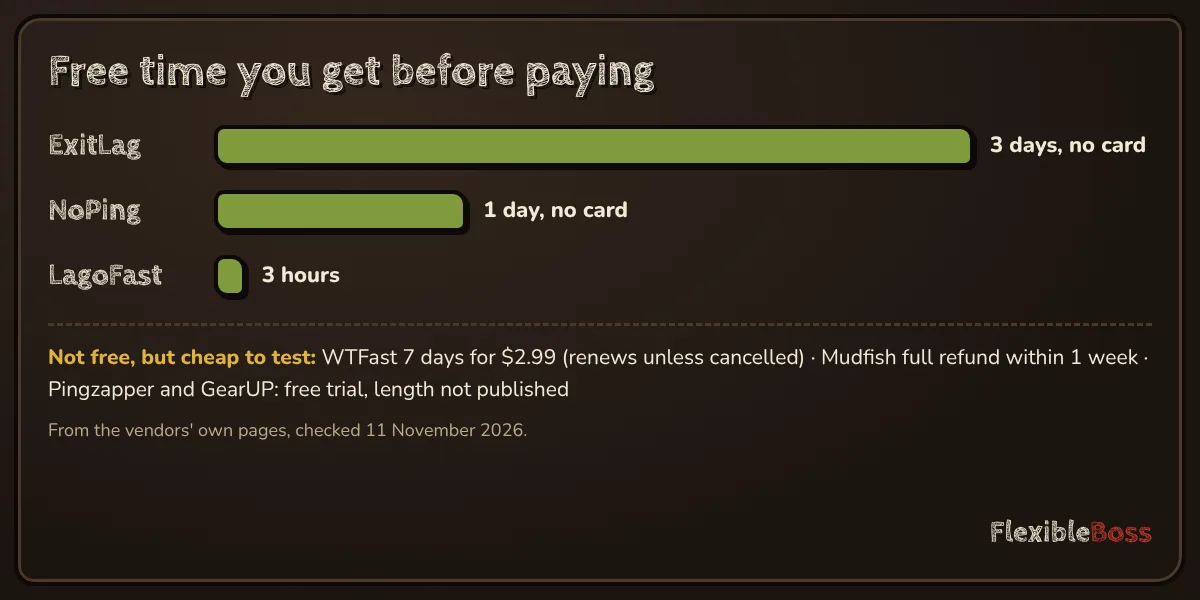
The practical advice: use the 3-day trial first, then start with the shortest plan, and only then consider a longer one.
How to test ExitLag properly
- Choose one game and one server region.
- Turn on the game's network overlay (or ExitLag's Network Analyzer) to see ping, spikes and packet loss.
- Play 10–15 minutes without ExitLag, then the same with ExitLag on.
- Repeat at your peak hour, on a different day.
- Judge spikes and packet loss, not only the average ping.
If the numbers do not improve during the free trial, do not subscribe: your lag comes from somewhere else. Our research method describes the same test.
Pros and cons
| Pros | Cons |
|---|---|
| Very easy to use: pick a game and connect | Subscription only; price varies by country |
| Large game list and server network (vendor's figures) | No console or macOS support listed |
| Useful extras: Multi-Internet, Traffic Shaper, Network Analyzer | Cannot fix Wi-Fi, bufferbloat or distance |
| 3-day free trial, no card, plus a 7-day refund window | Offers and trial terms change often |
ExitLag alternatives
If ExitLag does not fit, compare it with:
- Mudfish, if you play only a few hours a week and prefer to pay per gigabyte: see ExitLag vs Mudfish.
- LagoFast, if you also play on console or macOS: see ExitLag vs LagoFast.
- NoPing, the closest ExitLag-style tool, with a 1-day free trial and no card: ExitLag vs NoPing.
- GearUP, WTFast or Pingzapper: vs GearUP, vs WTFast, vs Pingzapper, or all six options in ExitLag alternatives.
Have a code already? See how to redeem an ExitLag code.
ExitLag review verdict: is it worth it?
ExitLag is a polished, easy booster with genuinely useful network tools, and it works when your lag is caused by poor routing between your provider and the game server. It is not a fix for Wi-Fi problems, overloaded connections or distant servers, and no review can tell you in advance which problem you have. Test it inside the refund window on the game you play most; keep it only if the spikes and packet loss go down.
Frequently asked questions
Does ExitLag actually work?
It works when the problem is the route between your internet provider and the game server, for example at peak hours or on international servers. It cannot help when the lag comes from your Wi-Fi, an overloaded home connection or a server that is physically far away. The only way to know is to test it on your own game.
Is ExitLag a VPN?
Not in the usual sense. Like a VPN it sends traffic through its own servers, but it is built to optimize the route of game traffic, not to hide your identity or encrypt all your browsing. If you need privacy, use a privacy VPN; if you need better game routes, a booster like ExitLag is the tool.
Is ExitLag safe?
ExitLag is a long-standing commercial product, used by professional players it names on its site. Download it only from the official website. Avoid cracked or 'free ExitLag' versions, which cannot connect to the real ExitLag network and may contain malware.
Is ExitLag worth it?
It is worth it if your test shows fewer spikes and less packet loss on the games you play most, especially at peak hours. If your ping does not change with ExitLag on, it is not worth paying for, and the 3-day free trial lets you find that out first.
Does ExitLag have a free trial?
Yes. ExitLag's trial page offers 3 days free with access to all features, and says no credit card is needed: you create an account, confirm your email and log in to the app. Its home page also notes refunds within 7 days of subscribing, subject to its terms.
Does ExitLag work on console or Mac?
ExitLag's home page lists Windows, iOS and Android as supported devices. Consoles and macOS are not on that list. For console play, see LagoFast in our ExitLag vs LagoFast comparison.
Sources we checked
Prices, trials and features change often. We re-check these pages before every update; last check 11 November 2026.