Battlefield 6 (BF6) high ping: how to see it, what causes it and the fixes that work
- Turn on ping in-game first: Options → System → Network → Scoreboard Ping. The Event Graph helps you spot client or server problems.
- EA lists three main causes: distance to the server, poor Wi-Fi and many people using the same network.
- Many players also report being matched to a distant data center. In Portal you can pick a nearby server in the Server Browser.
- Fix in this order: server status → cable → busy network → server choice → only then a ping booster.
High ping in Battlefield 6 (BF6) ruins exactly what the game does best: big, chaotic fights where a few milliseconds decide who wins the gunfight. The good news is that most causes can be found in ten minutes. This BF6 high ping guide shows how to see your real ping in the game, what the numbers mean, what EA says causes it, what players report about data centers, and the fixes in the order that saves the most time and money.
Step 1: check your real BF6 ping
Do not guess from how the game "feels". Turn on the numbers:
- Pause the game and open Options.
- Choose System.
- Under Network, turn on Scoreboard Ping.
EA's help also points to Show Event Graph and Show Damage Log, which help you tell client-side from server-side problems during play. Play a few rounds and note three things: your usual ping, how high the spikes go, and whether you see packet loss.
Ping, jitter and packet loss: what the BF6 numbers mean
Three numbers describe your connection, and they cause different kinds of lag:
| Number | What it is | How it feels in BF6 |
|---|---|---|
| Ping (latency) | Time for data to reach the server and come back, in milliseconds | Shots and movement register a little late; you lose close-range duels |
| Jitter | How much the ping varies from moment to moment | Unpredictable: fine one second, rubber-banding the next |
| Packet loss | Data that never arrives | Teleporting enemies, hits that do not count, sudden stops |
A steady ping matters more than a low one. A stable 60 ms usually plays better than a ping that jumps between 30 and 120 ms, because the game cannot smooth out sudden changes. Packet loss above zero, even in short bursts, is more noticeable than a few extra milliseconds. So when you test fixes, watch the spikes and loss, not only the average.
Step 2: what EA says causes high ping in BF6
According to EA's troubleshooting page, high ping, packet loss and lag are commonly caused by:
| Cause | What it looks like |
|---|---|
| Distance to the server | High but steady ping on every map |
| Poor Wi-Fi | Random spikes, packet loss, worse in some rooms |
| Many people on the same network | Ping jumps when someone streams, downloads or calls |
EA's broader advice adds checking the server status, using a wired connection, improving your router signal and changing the wireless channel.
Step 3: the problem EA does not list, wrong data centers
On EA's own forums, players report being matched to servers far from home:
- a US East Coast player routed to the Santiago, Chile data center at every launch, while community servers in Europe ran fine;
- European players routed to US or Japanese servers, with their providers confirming their own routing was correct.
These are individual reports, not an official explanation, but they matter: no change on your side fixes a match on another continent.
Which data center are you on?
Players on EA's forums say the data center your connection is routed through appears in the bottom-right corner of the settings screen in the main menu. Check it before you start changing cables and routers: if it shows a region far from you, your high ping is a matchmaking problem, not a home network problem.
Can you choose your region?
Not in official matchmaking, according to players' replies on EA's forums: there is no region selector, and DICE has not announced one. What you can choose is a community or Portal server by location in the Server Browser. A VPN changes where you appear to be, but players report mixed results, and it adds a hop to every packet, so it is not a reliable fix.
If your ping is high only in matchmaking and fine on nearby servers:
- in Portal, use the Server Browser to pick a server near you, as EA suggests;
- report the problem to EA with your region, the server location and screenshots of your ping.
Step 4: BF6 high ping fixes, in the right order
| Step | Fix | Cost | Fixes |
|---|---|---|---|
| 1 | Check EA server status | Free | Outages and maintenance |
| 2 | Switch from Wi-Fi to a cable | Free / cheap | Spikes and packet loss from Wi-Fi |
| 3 | Stop downloads, streams and cloud sync while playing | Free | Ping jumps on a busy network |
| 4 | Enable QoS or SQM on your router if available | Free | Bufferbloat under load |
| 5 | Choose a nearby server (Portal Server Browser) | Free | Distance, misrouted matches in Portal |
| 6 | Test a ping booster on the same server | Free trial | Bad routes between your provider and the data center |
Work from the top. Most players solve their BF6 lag in the first three steps.
BF6 high ping on PS5 and Xbox
Console players have fewer settings to change, but the same causes apply:
- Use Ethernet. A cable removes Wi-Fi spikes, the most common cause of packet loss at home.
- Run the console's own network test (PS5: Settings → Network → Connection Status; Xbox: Settings → General → Network settings) and note the latency and any packet loss.
- Turn on Scoreboard Ping in the game's options, as on PC, to compare servers.
- Pause downloads on the console and on other devices while you play; game updates are large and saturate the line.
- Router-level boosters exist for consoles (for example GearUP's HYPEREV router), but they need extra hardware and only help with routing, not Wi-Fi or a far-away match. See our GearUP review.
Peak hours: when BF6 ping gets worse in the evening
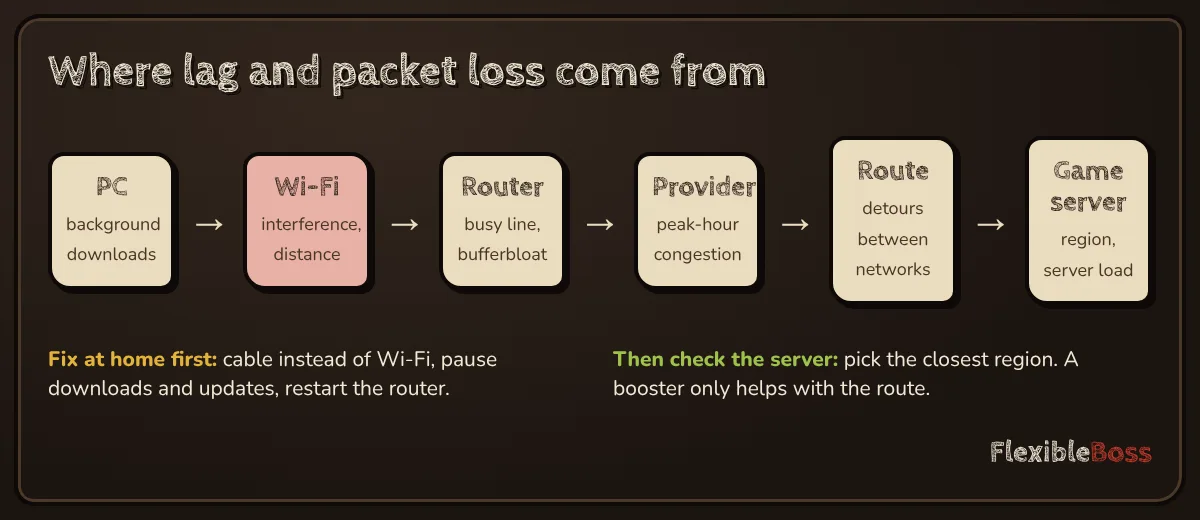
If your ping is fine in the morning and bad from about 7 pm, the cause is usually congestion at your provider or on the route to the data center, when everyone in your area is streaming. Two things to try, in order:
- Enable QoS or SQM on your router if it has it, so your game traffic is not stuck behind downloads in your own home.
- If the spikes come from outside your home, test a different route with a ping booster's free trial, on the same server at the same hour.
When a ping booster makes sense for BF6
A booster changes the route between your provider and the data center. That helps when:
- your ping is fine in the morning but spikes in the evening;
- you play on a data center in another country by choice (friends, community servers);
- your Wi-Fi and home network are fine, but you still see packet loss.
It does not help when the game puts you on another continent, when your Wi-Fi is the problem, or when someone at home is saturating the line. Test with a free trial first: ExitLag's 3-day trial and NoPing's free day need no card; see free ping booster and ExitLag alternatives.
Quick diagnosis table
| You see | Most likely cause | Do this |
|---|---|---|
| High ping on every server, every game | Your connection or distance | Cable, busy network, closer region |
| Spikes only on Wi-Fi | Wi-Fi | Cable or better Wi-Fi channel |
| High ping only in matchmaking | Wrong data center | Portal Server Browser, report to EA |
| Spikes in the evening only | Provider congestion | Test a booster |
| Everyone in the lobby lags | Server-side | Check server status, wait |
Our take
Turn on Scoreboard Ping, fix Wi-Fi and busy-network problems first, and watch which data center you land on. A booster is the last step, not the first, and worth paying for only if a free trial clearly cuts your spikes on the servers you actually play.
Frequently asked questions
How do I see my ping in Battlefield 6?
Pause the game, open Options, choose System, and under Network turn on Scoreboard Ping. EA's help also mentions showing the Event Graph or the Damage Log to spot client or server problems during play.
Why is my ping so high in Battlefield 6?
According to EA, high ping, packet loss and lag are commonly caused by distance to the servers, poor Wi-Fi, or many people using the same network at the same time. Players have also reported being matched to data centers far from their region.
Why does Battlefield 6 put me on servers in another region?
On EA's forums, players in Europe and the US have reported being routed to distant data centers, for example US East players landing in Santiago, Chile. These are player reports, not an EA explanation. In Portal, the Server Browser lets you choose a server near you; for matchmaking, report it to EA with your region and screenshots.
Can I choose my region in Battlefield 6 matchmaking?
Not in official matchmaking, according to players on EA's forums: there is no region selector there. Community and Portal servers can be picked by location in the Server Browser. Players also say the data center you are routed through is shown in the bottom-right corner of the settings screen in the main menu.
What is a good ping in BF6?
There is no official threshold. As a rule of thumb, a steady ping matters more than a low one: a stable 60 ms usually feels better than a ping that jumps between 30 and 120 ms. Packet loss above zero, even briefly, is more noticeable than a few extra milliseconds.
Does a ping booster help in Battlefield 6?
It can help when your provider's route to the data center is poor, especially at peak hours. It cannot fix Wi-Fi problems, a busy home network or being matched to a server on another continent.
Is BF6 high ping a server problem or my connection?
Check the server status first, then compare: if your ping is high on every server and in other games, the problem is on your side. If it is high only on certain servers or regions, it is the route or the matchmaking.
Sources we checked
Prices, trials and features change often. We re-check these pages before every update; last check 11 November 2026.
- EA Help: Troubleshoot ping in Battlefield 6 (in-game ping display, causes, Server Browser)
- EA Forums: Battlefield 6 connects to Chile servers instead of US East (player reports)
- EA Forums: How do I change my matchmaking region? (player replies)
- EA Forums: incorrect server region, EU player routed to US/Japan (player reports)