ExitLag vs Mudfish: subscription or pay-per-gigabyte, which game booster fits you?
- ExitLag is a subscription with an easy app, AI route selection and extras such as Multi-Internet and a traffic shaper.
- Mudfish charges per gigabyte (135 KRW per GB since September 2025), credits never expire, and it runs on Linux too.
- Light players usually pay less with Mudfish; daily players and anyone who wants no setup usually prefer ExitLag.
- Both let you test with little risk: ExitLag has a 3-day free trial (no card), Mudfish a full refund within one week.
ExitLag and Mudfish solve the same problem, a bad route between you and the game server, in very different ways. ExitLag is a polished subscription app that picks routes for you. Mudfish is a pay-per-gigabyte network that gives you the controls and charges only for what you use. In Mudfish vs ExitLag, the right choice depends less on which is "faster" and more on how much you play and how much you like to configure.
ExitLag vs Mudfish at a glance
| ExitLag | Mudfish | |
|---|---|---|
| How you pay | Subscription (price shown at checkout, varies by country) | Prepaid credits, charged per gigabyte of traffic |
| Price basis | Fixed per period | 135 KRW per GB on all nodes since 1 Sep 2025 |
| Try it / refunds | 3-day free trial, no card; refunds within 7 days of subscribing (terms apply) | Full refund for payments within the last week; partial balance refunds after |
| Do unused credits expire? | Not applicable | No |
| Platforms | Windows, iOS, Android | Windows, macOS, Linux; Android and iOS apps; browser extension |
| Games | 4,000+ games and apps (vendor's figure) | Works with games via node selection and game-only forwarding |
| Routing | AI route optimization, automatic | You choose nodes; Multi Path mode; game-only or Full VPN |
| Extras | Multi-Internet, Traffic Shaper, Network Analyzer, RAM/FPS boost | DNS client, browser extension |
| Setup effort | Low | Medium to high |
From the official websites and documentation, checked on 11 November 2026.
- Try it
- 3-day free trial, no card
- Pays
- Subscription, price shown by country
- Runs on
- Windows, iOS, Android
- Games
- 4,000+ (vendor's figure)
- One-click, automatic routing
- Multi-Internet and Traffic Shaper
- Built-in Network Analyzer
- No console or macOS listed
- Price only visible at checkout
- Try it
- Full refund within 1 week of payment
- Pays
- 135 KRW per GB; credits never expire
- Runs on
- Windows, macOS, Linux, Android, iOS, browser
- Credit packs
- From $4.99 to $99.99
- Cheapest for light players
- Multi Path and game-only modes
- Linux and macOS support
- Manual setup
- Downloads through it burn credits fast
Pricing: subscription vs pay-per-gigabyte
This is the biggest difference between the two.
ExitLag sells subscriptions. Its pricing page shows plans after it detects your country, so the price you see depends on where you are and on current promotions. New users get a 3-day free trial (no credit card, per its trial page), and the home page notes that refunds are possible within 7 days of subscribing, subject to its terms.
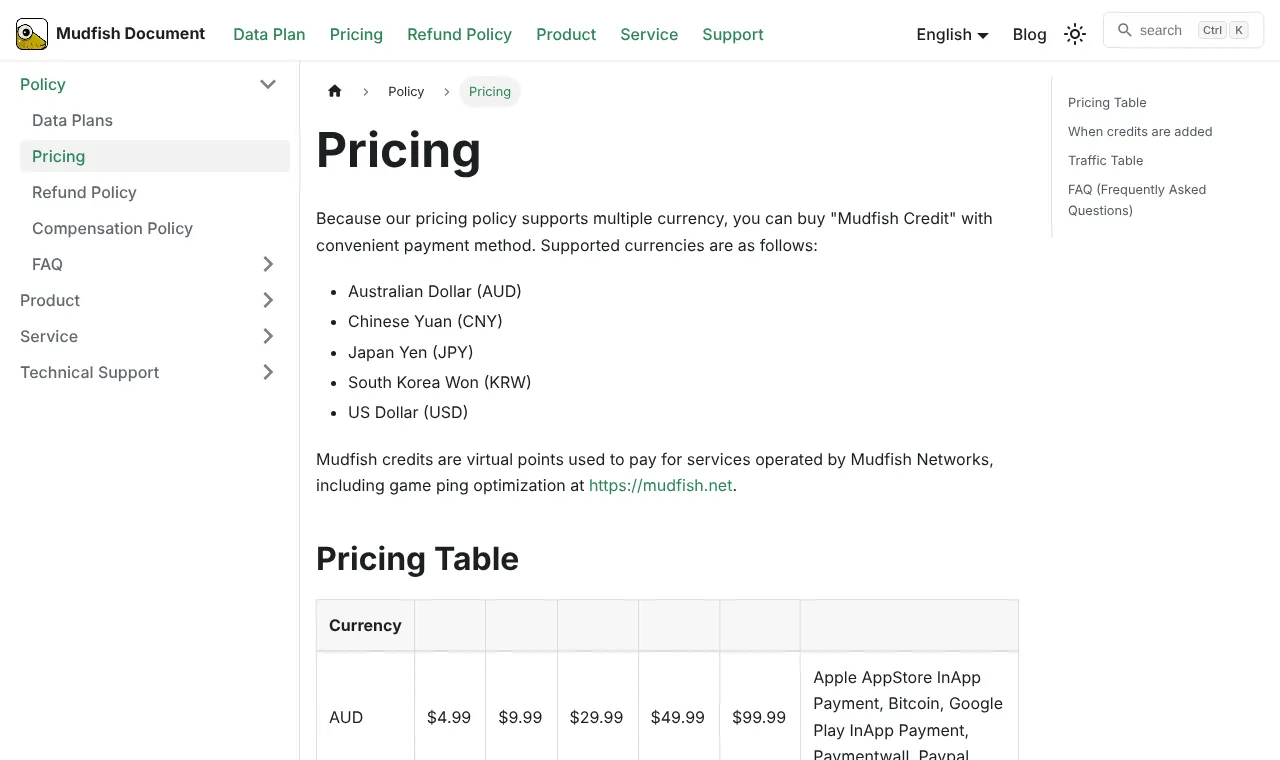
Mudfish uses a Pay-Per-Traffic plan by default. According to its documentation:
- since 1 September 2025, every Mudfish node costs 135 South Korean won per gigabyte;
- traffic is measured at the Mudfish node, in both directions: what the node receives and what it sends to you;
- credits are sold in packs of $4.99, $9.99, $29.99, $49.99 and $99.99 (also in AUD, CNY, JPY and KRW);
- credits do not expire.
Which costs less for you?
Online games send far less data than streaming or downloads, but the amount varies a lot by game, map size and server. Rather than relying on a generic estimate, check it yourself:
- Buy the smallest Mudfish pack ($4.99).
- Play your usual game for an hour with Mudfish on.
- Look at the traffic used in the Mudfish dashboard.
- Multiply by the hours you play in a month, then by 135 KRW per gigabyte.
Compare that monthly figure with the ExitLag price shown to you at checkout. As a rule of thumb, the fewer hours you play, the more the pay-per-gigabyte model wins. Remember one Mudfish detail: if you route downloads or full VPN traffic through it, usage grows very quickly, because every gigabyte you download counts twice at the node.
Features and routing
ExitLag is built around automatic routing. Its home page describes AI Route Optimization that prioritises the fastest paths to the game server, plus:
- Multi-Internet, which switches between more than one network connection to avoid disconnections;
- Traffic Shaper, which limits bandwidth for other activities while you play;
- Network Analyzer, which shows latency and packet loss and server ping by region;
- Performance Boost, which frees RAM to help FPS;
- Community Servers, community-made private servers reached through optimised routes.
Mudfish is built around control. Its Cloud VPN can forward only game traffic, run in Multi Path mode, or act as a Full VPN, and you pick the nodes yourself. That is powerful if you know which region your game server is in, and slower to set up if you do not.
Platforms and devices
| Device | ExitLag | Mudfish |
|---|---|---|
| Windows | Yes | Yes |
| macOS | Not listed among supported devices | Yes |
| Linux | Not listed | Yes |
| Android | Yes | Yes (app) |
| iOS | Yes | Yes (app) |
| Browser | No | Extension for Chrome, Firefox, Edge, Whale |
If you game on Linux or macOS, Mudfish is the only one of the two that lists them.
Ease of use
ExitLag is the easier tool by design: choose the game, connect, play. Mudfish expects you to create an account, verify your email, install the client, choose a mode and pick nodes. Its documentation is detailed, but beginners will need some time. If you want a booster you never have to think about, ExitLag wins this round clearly.
Refunds and trying before you commit
Both let you test with little risk, in different ways:
- ExitLag: a 3-day free trial with no credit card, according to its trial page; after paying, refunds within 7 days of subscribing, per the note on its home page.
- Mudfish: a full refund for payments made within the last week. After that, you can ask for a refund of the unused balance under the conditions in the refund policy. Mudfish's own documentation advises testing thoroughly during the first week, and warns that repeated pay-and-refund cycles can be treated as abuse.
Mudfish vs ExitLag: which one should you choose?
| If you… | Pick |
|---|---|
| Play less than an hour a day | Mudfish |
| Play every day, for hours | ExitLag (compare the subscription price with your Mudfish estimate) |
| Want zero setup | ExitLag |
| Play on Linux or macOS | Mudfish |
| Want Multi-Internet or a traffic shaper built in | ExitLag |
| Like to choose nodes and routes yourself | Mudfish |
Whichever you lean towards, test both on the same game and server, at the same time of day. Our method page explains the 15-minute comparison. If neither improves on your normal connection, the lag is probably local: see the free fixes in our free ping booster guide.
Our take
Mudfish is the smart buy for light players and tinkerers: you pay only for traffic, credits never expire, and it runs on more systems. ExitLag is the comfortable choice for daily players who want it to just work, with useful extras on Windows. For more options, see our ExitLag alternatives and the full ExitLag review.
Frequently asked questions
Is Mudfish better than ExitLag?
Neither is better for everyone. Mudfish is cheaper for players who game a few hours a week and gives more manual control, including on Linux. ExitLag is easier to use, needs almost no setup and adds extras like Multi-Internet and a traffic shaper. Test both on your own game.
Is Mudfish cheaper than ExitLag?
For light use, usually yes, because Mudfish charges only for traffic (135 South Korean won per gigabyte) and credits do not expire. If you play many hours every day, a subscription can work out cheaper. ExitLag's prices depend on your country, so compare at checkout.
Does Mudfish have a free trial?
Mudfish works on prepaid credits rather than a classic free trial, but its refund policy gives a full refund for payments made within the last week. Its own documentation suggests testing thoroughly during that first week.
Which is easier to use, ExitLag or Mudfish?
ExitLag. You pick a game and connect, and its route optimization does the rest. Mudfish asks you to choose nodes and modes yourself, which gives more control but takes longer to set up.
Do ExitLag and Mudfish both use multipath?
Both offer ways to use more than one path. Mudfish has a Multi Path mode in its Cloud VPN. ExitLag optimizes routes automatically and has a Multi-Internet feature that switches between more than one network connection.
Sources we checked
Prices, trials and features change often. We re-check these pages before every update; last check 11 November 2026.
- ExitLag: free trial page (3 days, no credit card)
- ExitLag: home page (devices, features, 4,000+ games, refund note)
- ExitLag: FAQ (free trial, subscriptions, multiplayer plan)
- Mudfish: products and comparison (Multi Path, Full VPN)
- Mudfish docs: data plans (135 KRW per GB, traffic measured at the node)
- Mudfish docs: pricing (credit packs and currencies)
- Mudfish docs: refund policy