ExitLag alternatives: 6 game boosters compared, including free and pay-as-you-go options
- The closest like-for-like ExitLag alternative is NoPing: multi-route connections, 4,000+ games and a 1-day free trial with no card.
- If you play only a few hours a week, Mudfish is usually cheapest: you pay per gigabyte of traffic instead of a monthly subscription.
- For PC plus console and mobile, look at LagoFast or GearUP; for a $2.99 one-week test, WTFast.
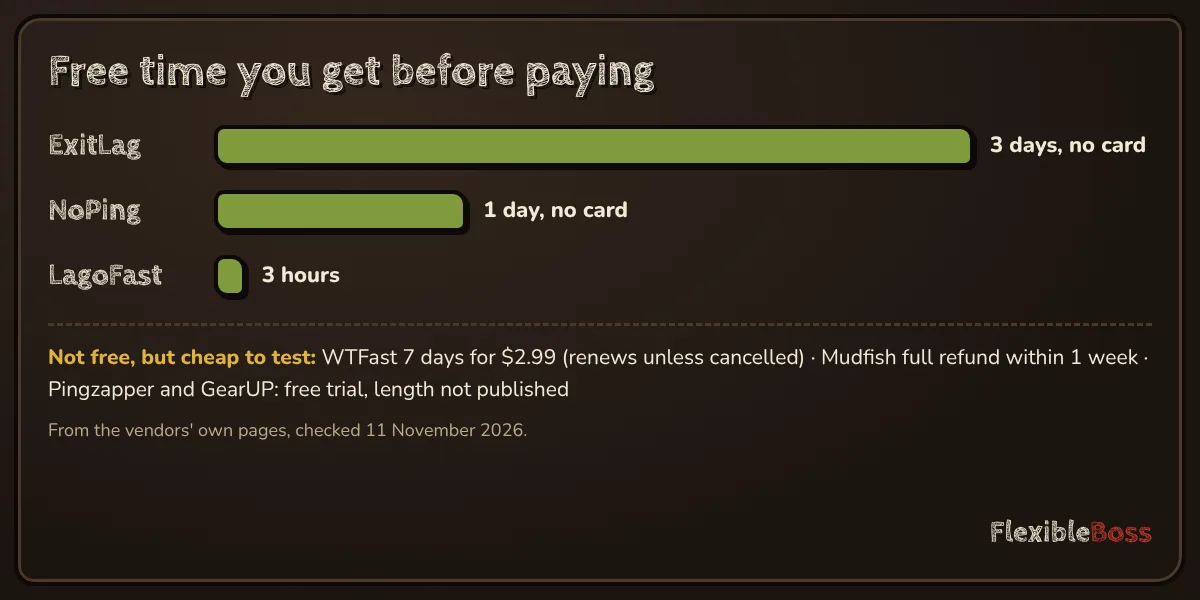
- There is no fully free, unlimited ExitLag equivalent. The free route is trials, refund windows and the fixes in our free ping booster guide.
ExitLag is the best-known game booster, but it is not the only one, and for many players it is not the best fit. Some alternatives cost less if you play a few hours a week, some run on consoles, and some let you test them for a day without entering a card. This guide compares six ExitLag alternatives on the things that decide whether one will work for you: how you can try it, how you pay, where it runs and what kind of player it suits.
Everything below comes from the vendors' own pages, listed at the end under Sources we checked. We do not publish ping numbers we have not measured ourselves: instead, the last section shows how to compare boosters on your own connection during a trial.
The six best ExitLag alternatives at a glance
| Booster | How you can try it | How you pay | Platforms (vendor's list) | Best for |
|---|---|---|---|---|
| NoPing | 1-day free trial, no card | Subscription | PC, Android, iOS | Players who want the closest ExitLag-style tool |
| Mudfish | Full refund within 1 week of payment | Pay per traffic (credits) | Windows, macOS, Linux, Android, iOS, browser extension | Light players and tinkerers |
| LagoFast | 3-hour free trial | From about $9.90/month, less on longer plans | Windows, macOS, Android, iOS, PlayStation, Xbox, Switch, Steam Deck | PC + console + mobile in one account |
| WTFast | 7 days for $2.99 | Subscription | Windows (and more, see site) | A cheap, full-access one-week test |
| Pingzapper | Free trial | $5.99 or $8.99 per month (plans on its home page) | Windows | Simple, lightweight setups |
| GearUP Booster | Free trial | Subscription | Windows, iOS, Android; consoles via its router | Beginners who want one-click boosting |
Checked on the official websites on 11 November 2026. Plans and prices can differ by country and change often: always confirm at checkout.
- Try it
- 1 day free, no card
- Pays
- Subscription (coupon field at checkout)
- Runs on
- PC, Android, iOS
- Network
- 2,000+ servers in 150+ countries (vendor's figure)
- Multi Connection: 5 routes at once
- Multi Internet: up to 6 connections
- Easiest free test
- Trial lasts only one day
- Prices shown only after sign-in
- Try it
- Full refund within 1 week of payment
- Pays
- 135 KRW per GB; credits never expire
- Runs on
- Windows, macOS, Linux, Android, iOS, browser
- Credit packs
- From $4.99 to $99.99
- Cheapest for light players
- Multi Path and game-only modes
- Linux and macOS support
- Manual setup
- Downloads through it burn credits fast
- Try it
- 3-hour free trial from sign-up
- Pays
- About $9.90/month, down to about $5.40/month on a 12-month plan
- Runs on
- Windows, macOS, Android, iOS, PlayStation, Xbox, Switch, Steam Deck
- Games
- 8,000+ (vendor's figure)
- Consoles and Mac covered
- FPS booster and game translation
- Also on the Microsoft Store
- Trial is only 3 hours
- Best price needs a 12-month plan
- Try it
- 7 days of full access for $2.99
- Pays
- Subscription after the trial
- Games
- 1,000+ (vendor's figure)
- Around since
- 2009
- Full features during the test week
- Real-time route analytics
- Emails you before the trial ends
- Renews automatically unless you cancel
- Smaller game list than ExitLag
- Try it
- Free trial
- Pays
- Standard $5.99/month, Premium $8.99/month
- Runs on
- Windows
- Network
- 44 servers in 21 countries
- Simple, lightweight app
- Premium adds packet-loss stats and premium servers
- Windows only
- 115 game profiles: check yours is there
- Try it
- Free trial (3 days per its terms), card required
- Pays
- Subscription; mobile $6.99, router $9.99 a month
- Runs on
- Windows, iOS, Android; consoles via its router (HYPEREV)
- Games
- 3,000+ (vendor's figure)
- One-click, no settings
- Router option for PlayStation, Xbox and Switch
- Built into selected ASUS routers
- Console boosting needs extra hardware
- Trial needs a card and renews automatically
How a ping booster works (and when an alternative will not help)
All of these tools do the same basic job. Instead of letting your internet provider pick the path to the game server, the booster sends your game traffic through its own network of servers, choosing routes that are shorter or less congested. Some, like ExitLag and NoPing, also send copies of your traffic over several routes at once, so a single bad path does less damage.
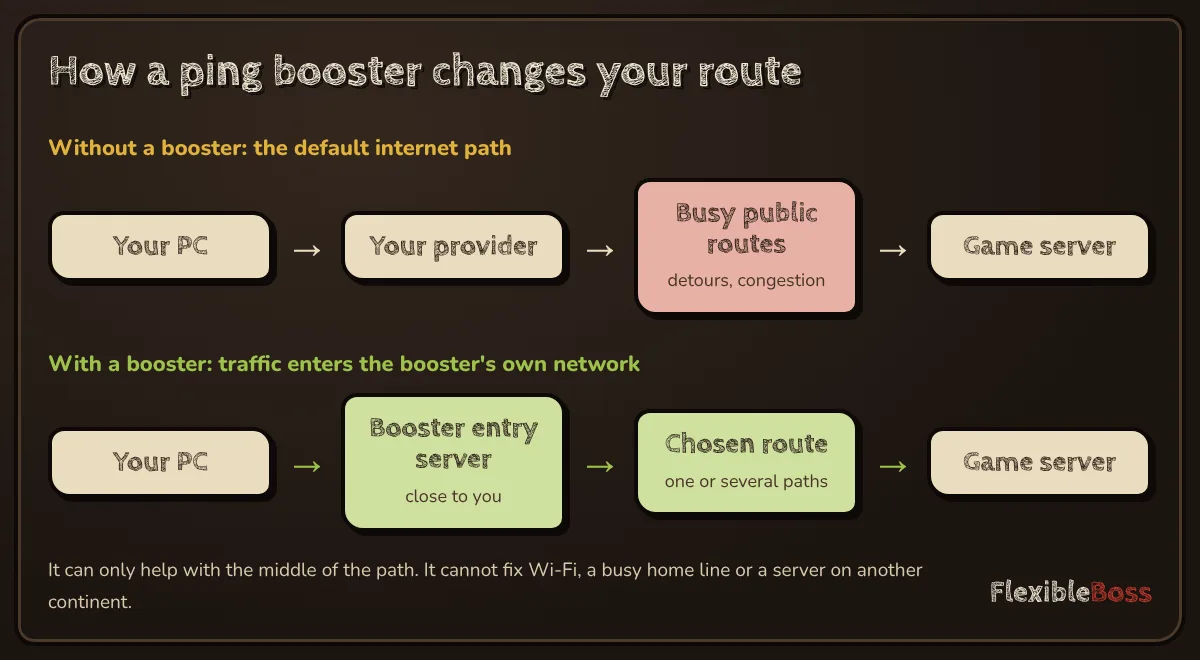
That helps in a specific situation: when the problem is the route between your provider and the game server. It does not help when:
- Your Wi-Fi is the bottleneck. Interference, a weak signal or a busy home network adds lag before your traffic even reaches your provider.
- The server is simply far away. Light in optical fibre covers roughly 100 km per millisecond of round-trip time. No booster can make a server 6,000 km away feel local.
- Your connection is overloaded. A download or a video call on the same line can cause "bufferbloat", with ping shooting up under load.
If any of these sound familiar, the free ping booster guide covers the fixes that cost nothing.
NoPing: the closest ExitLag-style alternative
NoPing works the same way as ExitLag: it optimises routes for a long list of games and can split your connection across several paths. On its pricing page NoPing advertises low ping in more than 4,000 games, an FPS booster and Multi Connection across 5 routes.
Its biggest advantage for anyone comparing tools is the trial: 1 day free, with no card. That is enough for three or four sessions on your main game at different times of day, which is exactly what you need for a fair comparison.
Choose NoPing if you want ExitLag's approach (multi-route, a huge game list) and the easiest possible free test.
Mudfish: pay only for the traffic you use
Mudfish takes a completely different approach. There is no monthly subscription by default: you buy Mudfish credits and pay for the traffic that passes through its network. According to its documentation, since 1 September 2025 all Mudfish nodes cost 135 South Korean won per gigabyte, and traffic is counted at the node, in both directions.
Credits are sold in packs from $4.99 to $99.99 (also in AUD, CNY, JPY and KRW) and, according to the refund policy, do not expire. Payments can be fully refunded within one week; after that, a partial refund of the unused balance is possible under conditions set out in the policy.
Mudfish runs on Windows, macOS and Linux, has Android and iOS apps and a browser extension. Its Cloud VPN can forward only game traffic, use a Multi Path mode, or act as a full VPN. The trade-off is setup: you choose nodes and options yourself, which suits players who like to tinker. We compare the two directly in ExitLag vs Mudfish.
Choose Mudfish if you play a few hours a week, want to avoid subscriptions, or need Linux support.
LagoFast: one account for PC, console and mobile
LagoFast covers the widest range of devices among these alternatives. Its home page lists Windows, macOS, Android, iOS, PlayStation, Xbox, Switch and Steam Deck, claims support for more than 8,000 games, and bundles an FPS booster and real-time game translation. You can start with a free trial from the site.
Choose LagoFast if you play on more than one device, especially a console. The full head-to-head is in ExitLag vs LagoFast.
WTFast: a paid week for $2.99
WTFast is one of the oldest "gamers' private networks". Instead of a free trial it offers 7 days of full access for $2.99, after which the plan renews as a subscription at the price shown at checkout, unless you cancel before the trial ends. WTFast says it emails you before the trial ends.
Choose WTFast if you want a full-featured test week for a small, known cost. Set a reminder to cancel if it does not help.
Pingzapper: simple and light
Pingzapper is a lightweight game proxy with automatic server selection and real-time ping and packet-loss graphs. Its home page lists 44 servers in 28 cities across 21 countries, 115 game profiles, a free trial and plans at $5.99 and $8.99 per month.
Choose Pingzapper if your game is on its list and you want something simple, without extra system tools.
GearUP Booster: one-click for beginners
GearUP Booster focuses on simplicity: pick a game, press boost, and it chooses the route. Its site says the Windows app can also boost console games and that trials of the software are available.
Choose GearUP if you do not want to touch any settings.
Which ExitLag alternative should you pick?
| If you… | Start with |
|---|---|
| Want the closest thing to ExitLag | NoPing (1-day free trial, no card) |
| Play less than an hour a day | Mudfish (pay per gigabyte, credits do not expire) |
| Play on console as well as PC | LagoFast |
| Want a full test week for a known price | WTFast ($2.99 for 7 days) |
| Play one or two supported games and want simplicity | Pingzapper |
| Do not want to configure anything | GearUP Booster |
| Already like ExitLag but want to check it is worth it | Our ExitLag review |
Head-to-head comparisons: ExitLag vs NoPing, ExitLag vs Mudfish, ExitLag vs LagoFast, ExitLag vs GearUP, ExitLag vs WTFast and ExitLag vs Pingzapper. Full reviews: LagoFast and GearUP. Discounts: ping booster promo codes.
How to compare alternatives during a trial
Marketing pages promise big reductions in ping, but the only result that matters is the one on your connection. A fair comparison takes about an hour spread over a few days:
- Pick one game, one server, one mode. Use the same region every time.
- Turn on the game's network overlay so you can see ping and packet loss.
- Play 10–15 minutes without any booster, then the same with each booster you are testing.
- Repeat at your usual peak hour. Evening congestion is when routing problems show up.
- Compare spikes and packet loss, not just the average. A booster that removes 200 ms spikes is worth more than one that shaves 5 ms off a steady connection.
If no booster beats your normal connection, you have learned something valuable: your lag comes from somewhere else, and a subscription will not fix it. Our method page explains the same test in more detail.
Our take
There is no single best ExitLag alternative. NoPing is the closest match and free to test for a day, Mudfish is the cheapest for light players, and LagoFast is the most flexible across devices. Use the free trials and refund windows to test two of them on your own game before paying for anything.
Frequently asked questions
What is the best alternative to ExitLag?
It depends on how you play. NoPing is the closest match in features (multi-route connections, thousands of supported games). Mudfish is the cheapest for light players because it charges per gigabyte. LagoFast and GearUP cover consoles and mobile as well as PC.
Is there a free alternative to ExitLag?
Not a fully free, unlimited one. You can test ExitLag itself for 3 days free, without a card, and most alternatives for free or almost free: NoPing has a 1-day trial without a card, Pingzapper and LagoFast offer free trials, and WTFast offers 7 days for $2.99. Mudfish gives a full refund within one week of payment.
Which ExitLag alternative is cheapest?
For players who game a few hours a week, Mudfish is usually cheapest, because it charges for the traffic you use (135 South Korean won per gigabyte since 1 September 2025) and credits do not expire. Heavy players may pay less with a monthly plan.
Do ExitLag alternatives work on console?
Some do. LagoFast lists PlayStation, Xbox and Switch among its platforms, and GearUP says its Windows app can also boost console games. ExitLag itself lists Windows, iOS and Android.
Can an ExitLag alternative lower ping on Wi-Fi?
It can improve the route between your internet provider and the game server, but it cannot fix interference or congestion on your own Wi-Fi. If your ping jumps only on Wi-Fi, try a cable or a better Wi-Fi channel first.
Sources we checked
Prices, trials and features change often. We re-check these pages before every update; last check 11 November 2026.
- ExitLag: free trial page (3 days, no credit card)
- ExitLag: home page (supported devices, features, refund note)
- NoPing: pricing and free trial
- Mudfish docs: data plans (pay per traffic)
- Mudfish docs: pricing and credit packs
- Mudfish docs: refund policy
- LagoFast: home page (platforms, free trial)
- LagoFast blog: Is LagoFast free? (trial length, plan prices)
- WTFast: pricing and $2.99 trial
- Pingzapper: home page (plans, servers)
- GearUP Booster: pricing